
View All Tutorials

How to Add Additional Guests to your Invitation
It's easy to add more guests to your invitation even after it is sent. Your new guests will instantly receive your invite.
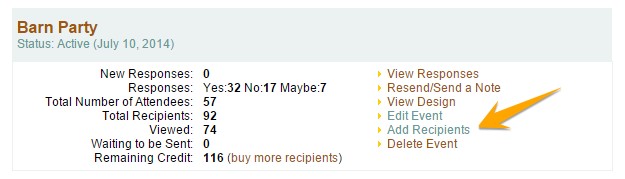
1. Login to your account. Under My Events, locate your event and click Add Recipients.
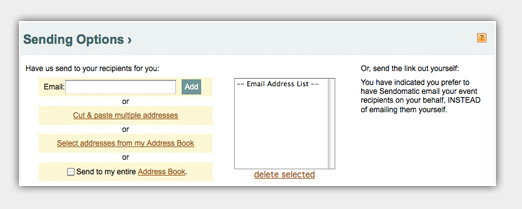
2. Locate the Email box under Sending Options. Enter the e-mail address of each recipient one at a time, clicking add - or use one of the other available import methods: Cut and Paste Multiple or Select Addresses from my Address Book.
3. Once you have added recipients, click Send.
Once completed, your invite will be on it's way!
Have more questions that are not listed above? Search our Knowledge Base.
Try Sendo Now!
FREE! Send to 10 people or just test it out!